Date Calculator - An aid for Family Historians Instructions
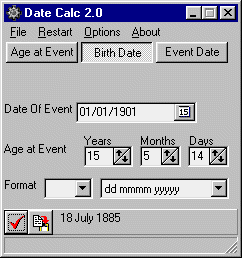
When you run the program a window this is displayed.
The details of which are shown below.
You must first select what you want to calculate before you can enter any dates. Once you select an option the input fields will become available.
| Calculate Button Set | The three buttons allow you to select what you would like to calculate. |
| Birth Date | Enter a known date of birth to calculate age at event or event date from age at event. |
| Event Date | This could be death, wedding or census etc. |
| Age at event | This is split into years, months and days. Any number may be entered up to 999 in each field and the calculation will still work. |
| Copy to Clipboard Button | When this is checked on pressing the Update button the result will be passed into the clipboard ready for pasting in to another program. |
| Red Tick | Performs the calculation |
| Menu File Close | Exits Program |
| Menu Restart | Clears all date fields |
| Menu Options Tool Tips | Toggles the display of the yellow pop up tool tips |
| Menu Options Autocopy to Clipboard | When Selected each time the update button is clicked the computed date is copied to the clipboard |
| Menu Options View Log | Shows DateCalc Log which provides all calculations in comma separated format with the ability to save to disk. |
Version information
2.3
Added Always on top option to the Options menu.
2.2
Added more setting memories to remember the settings and screen position last used
Added more date formats including ones providing Date information.
2.1
Removed ReadMe file and added proper help file.
2.0
New Log function
Complete rewrite of date routines.
Option to output ages in Months and Days Only
1.2.3
Correct Date Encode error on birth date calculate, where number of days entered equals day in the event date.
Allow Selection of date format and if it is to be prefixed with a string
1.2
Simplified interface and install
1.0c
New screen layout with automatic selection of input fields.
New Clear Button to empty all fields.
1.0c is currently only available for Windows 95.1.0b
Fixed (hopefully) where a additional number of days meant an error of a month in the result. It may still be out by a day and I will endeavour to resolve it as time allows.
Added Close Button
1.0
Initial release